Neighbor AP
The Neighbor AP page provides information about detected APs in the neighborhood for the detection of unexpected APs and deployment of APs to suit the coverage goal. Note that you can only view devices in your authorized level of access.
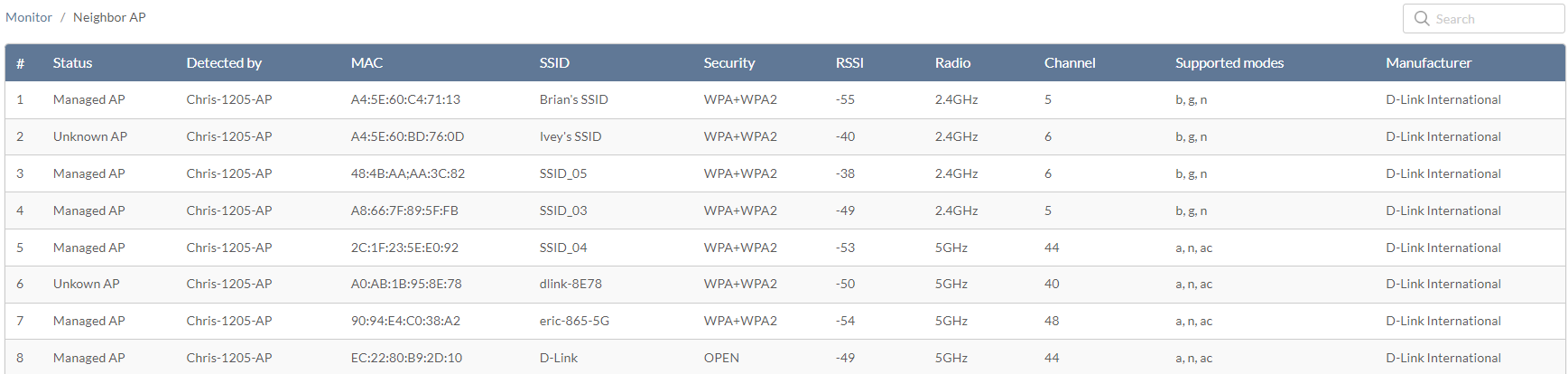
Wireless Neighbor AP Report
- Navigate to Monitor > Neighbor AP.
The following information is displayed:
|
Status |
State whether the AP is managed or unknown in the defined site. The site can be selected at the top. |
|
Detected by |
The device that detected this neighbor AP. |
| MAC | The MAC address of this neighbor AP. |
| SSID | The SSID name of this neighbor AP. |
| Security | The security method configured on the neighbor AP. |
| RSSI | Received Signal Strength Indication (RSSI), which measures the power of a received radio signal. |
| Radio | The radio frequency that the neighbor AP is operating on. |
| Channel | The channel on which the access point is currently broadcasting. |
| Supported Modes | The wireless standards that the neighbor AP supports. |
| Manufacturer | The manufacturer of the neighbor AP. |
- [Optional] Enter a keyword in the Search field to filter the table listing.